 SEO & Accessibility
 AI
AI Localization
 Ecommerce
 Forms
Forms Fields
 Development
 Security
 Templating
 Performance
 Control Panel
 Widgets
 Assets
 Utilities
 Mailer Adapters
 Social Networking
 Integrations
Bee
Recombee recommendations for Craft CMS and Craft Commerce.
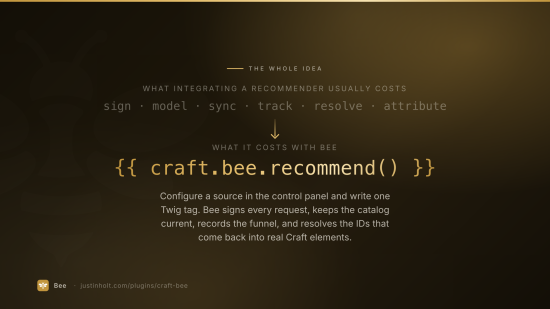
Bee connects a Craft site to Recombee — catalog sync, interaction tracking, personalised recommendations and search — without writing a line of API code. Templates get Craft elements back, in Recombee's order, ready to loop over.
{% for product in craft.bee.recommend({ count: 6, scenario: 'homepage' }) %}
  <a href="{{ product.url }}">{{ product.title }} — {{ product.price|commerceCurrency }}</a>
{% endfor %}
- Craft CMS 5.3+, PHP 8.2+
- Craft Commerce 5 supported, and entirely optional
- No runtime dependencies. The Recombee client is ~200 lines using Craft's own Guzzle.
- Lite is free. Pro is $149.
What it does
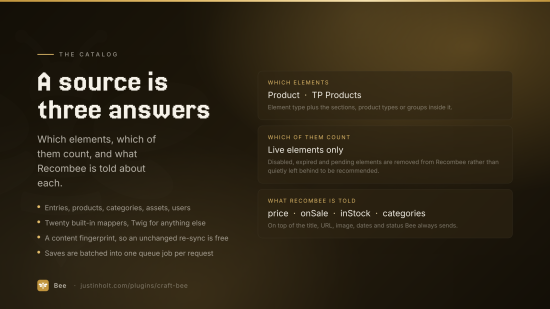
Catalog sync. Say which sections, product types, volumes or category groups become Recombee items, and what Recombee is told about them. Elements are pushed when they are saved, removed when they are unpublished or deleted, and re-sent in bulk from a console command. A content fingerprint means an unchanged element costs nothing.
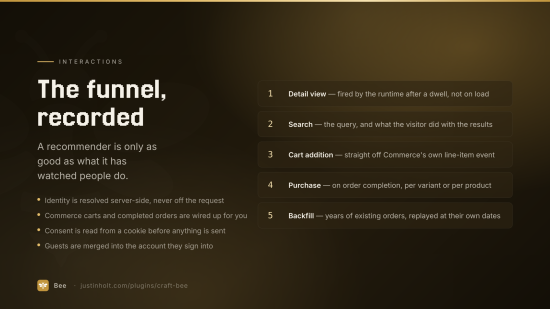
Interaction tracking. A dependency-free front-end runtime records detail views with real dwell time. Commerce's order funnel becomes purchases and cart additions. Everything else — bookmarks, ratings, view portions — is a one-line Twig or JavaScript call.
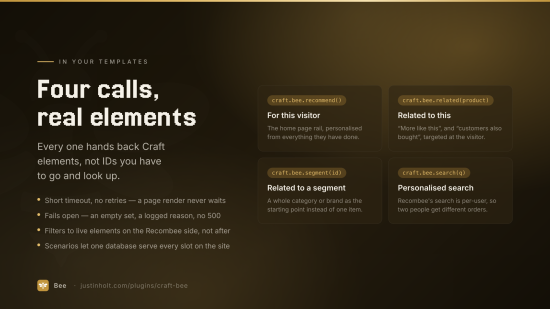
Recommendations and search. Personalised recommendations, related items, item segments and Recombee's own personalised search, all returning Craft elements.
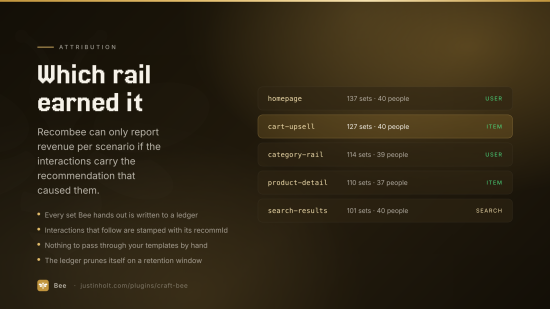
Attribution. Bee records which recommendation put an item in front of a visitor and attaches
that recommId to the interaction that follows. That is the only way Recombee can score — or learn
from — its own suggestions, and it is what turns the Recombee console's revenue reporting on.
Historic backfill. A brand-new Recombee database knows nothing. Your Craft install is sitting on
years of orders. php craft bee/interactions/backfill replays them, with their original timestamps,
and is safe to run twice.
composer require justinholtweb/craft-bee
php craft plugin/install bee
Then, in .env:
BEE_DATABASE_ID="your-database-id"
BEE_PRIVATE_TOKEN="your-private-token"
and in Settings → Bee, point the two fields at those variables, pick the region your Recombee database was created in, and press Test connection.
A database reached in the wrong region answers 401, not 404. If the credentials look right and you are still getting 401, check the region first.
Then:
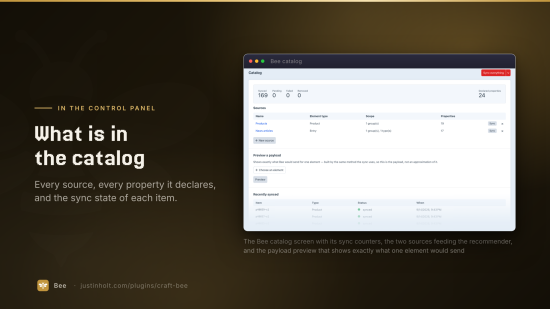
- Bee → Catalog → New source. Pick an element type and the sections or product types it covers. Add property mappings for anything you want to filter, boost or display on.
- Sync everything. Or
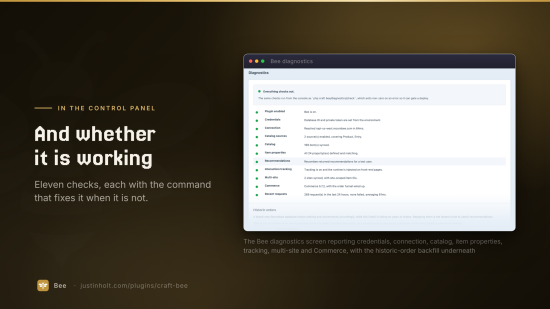
php craft bee/sync/catalog. - Bee → Diagnostics. Ten checks, each with a fix, in the order things have to be true.
Catalog sources
A source is "these elements become Recombee items, with these properties". Sources live in project config, so they travel with a deploy rather than needing to be re-clicked in every environment.
Properties Bee always sends
title, url, imageUrl, itemType, siteId, sourceHandle, slug, enabled, postDate,
expiryDate, updatedAt.
These are not optional. Every recommendation request is filtered on enabled, postDate and
expiryDate, because the catalog is push-based and can lag — without that filter the first symptom
of a sync problem is recommending something that was unpublished an hour ago.
Mappings
Each mapping is a Recombee property name, a type, and where to read it from:
| Read from | Value |
|---|---|
| Custom field | a field handle |
| Element attribute | title, slug, postDate, url, … |
| Built-in mapper | one of the keys below |
| Twig | an object template, e.g. {{ object.author.fullName }} |
Built-in mappers cover the common cases: image, images, author, categories, categoryIds,
tags, wordCount, readingMinutes, ancestors, kind, plus the Commerce family —
commerce:price, commerce:promotionalPrice, commerce:onSale, commerce:sku, commerce:stock,
commerce:inStock, commerce:productType, commerce:variantCount, commerce:variantSkus,
commerce:minPrice, commerce:maxPrice, commerce:weight, commerce:productId.
Values are coerced to the declared Recombee type, and dropped if they cannot be. A property declared
double that receives "12.00" would otherwise get the whole item rejected.
Recombee has one property namespace per database. Two sources that both send
pricehave to agree on its type; Bee reports the disagreement rather than silently breaking one of them.
Item IDs
e42 for an entry, p42 for a product, v42 for a variant, c42, a42, and so on. As soon as
more than one site is synced the site ID joins them: e42-s2. Changing which sites are synced
therefore changes every item ID — re-sync with --force afterwards, and bee/sync/purge the
strays. Diagnostics will tell you if this has happened.
Recommendations in templates
{# Personalised for the visitor #}
{% set recs = craft.bee.recommend({ count: 6, scenario: 'homepage' }) %}

{# Related to this item #}
{% set related = craft.bee.related(product, { count: 4, scenario: 'product-detail' }) %}

{# Recombee's own search (Pro) #}
{% set results = craft.bee.search(craft.app.request.getParam('q'), { count: 24 }) %}

{# Best of a segment (Pro) #}
{% set best = craft.bee.segment('brand-acme', { count: 8 }) %}
Each returns a RecommendationSet. Loop it and you get Craft elements, in Recombee's order, with
anything Craft can no longer resolve dropped:
{% for product in related %}
  <a href="{{ product.url }}" {{ craft.bee.attribution(related, product) }}>
    {{ product.title }}
  </a>
{% else %}
  {# Nothing came back. Recommendations never throw — always have a fallback. #}
  {% for product in craft.commerce.products.limit(4).all() %}…{% endfor %}
{% endfor %}
craft.bee.attribution() renders the two data attributes the runtime reads on click, so the detail
view on the next page carries the recommId. Without it, Recombee cannot tell you whether its
recommendations are working.
Options
| Option | |
|---|---|
count | how many. Defaults to the setting. |
scenario | the Recombee scenario, e.g. homepage, cart, emailing. |
filter | extra ReQL, combined with (not replacing) the live-content filter. |
live | false to drop the live-content filter. |
siteId | which site to resolve elements in. |
userId | override the visitor. Never accept this from a request. |
booster, logic, diversity, expertSettings, reqlExpressions, returnAbGroup | passed straight through. Pro. |
On the set
recs.recommId | the ID to attribute interactions to |
recs.ids() | the raw Recombee item IDs |
recs.elements() | the resolved Craft elements |
recs.values() | properties Recombee returned, if you asked for them |
recs.isEmpty(), recs.failed | nothing came back / the request failed |
recs.hasMore(), recs.next() | the next page of the same recommendation. Pro. |
recs.abGroup | the A/B group, when returnAbGroup was set |
Tracking
The front-end runtime handles the usual case on its own. Tell it what the page is about:
<body {{ craft.bee.pageItem(entry) }}>
and it will record a detail view once the visitor has actually stayed (three seconds by default —
firing on load counts every bounce and every prefetch as interest), send the final dwell time on
unload, and carry the recommId from whatever recommendation they clicked to get here.
Everything else, from JavaScript:
Bee.cartAdd('v1234', 2, 19.99);
Bee.bookmark('e42');
Bee.rate('e42', 0.5);      // Recombee's scale runs -1 … 1
Bee.portion('e42', 0.75);
Bee.stop();                // consent declined after load
or from Twig, server-side:
{% do craft.bee.trackView(entry) %}
{% do craft.bee.trackRating(entry, craft.bee.stars(4)) %}   {# 4 out of 5 → 0.5 #}
The visitor is always resolved server-side, from the session or a signed first-party cookie. The browser cannot name a user, the tracking endpoint refuses items that are not in the catalog, and it is rate limited. Nothing personal is stored against a guest ID.
Identity
| Signed in | u{user uid} |
| Guest | g{random token}, in a first-party cookie |
| Guest signs in, or checks out | the two are merged in Recombee (Pro) |
That merge is the point. Most of a visitor's history happens before they have an account, and throwing it away at the moment they sign up is throwing away the part that led to the sale.
Consent
Set Consent to "Only when a consent cookie says so" and name the cookie your CMP sets. Unknown consent is treated as not granted — a visitor who has not answered the banner has not said yes, and an interaction sent now cannot be recalled later.
Caching
Bee writes nothing visitor-specific into a page. The runtime's configuration is page-specific, the consent answer is read from a cookie in the browser, and the guest cookie is minted by the tracking endpoint rather than the page render. Pages carrying the runtime stay cacheable.
craft.bee.recommend() is the exception, and unavoidably so: a personalised block is personal.
Commerce
Install Commerce and Bee picks it up. Add a Product or Variant source, and:
- Purchases are recorded on order completion, one per line item, with the unit price and the
quantity — and the order's own timestamp, not
now. - Cart additions are recorded when a line item is genuinely new (Pro). A quantity edit and a shipping recalculation both re-save every line on the order; neither is an "add to cart".
- Guest checkout merges the cookie profile into the account Commerce creates (Pro).
- Historic orders replay with
php craft bee/interactions/backfill.
Variants are preferred over products when both are synced — the variant is the thing with a price, a SKU and a stock level — and Bee falls back to the product when only products are in the catalog.
Everything Commerce lives in one service. A content-only install never loads a Commerce class.
Console
php craft bee/sync/catalog                    # sync every source
php craft bee/sync/catalog --force            # re-send even unchanged items
php craft bee/sync/catalog --source=Products  # one source
php craft bee/sync/catalog --dry-run          # build and log, send nothing
php craft bee/sync/properties                 # create declared item properties
php craft bee/sync/element 1234               # one element
php craft bee/sync/purge                      # delete excluded and failed items

php craft bee/interactions/backfill --since=2024-01-01 --limit=5000

php craft bee/log/tail --failures
php craft bee/log/prune --days=7
php craft bee/log/clear

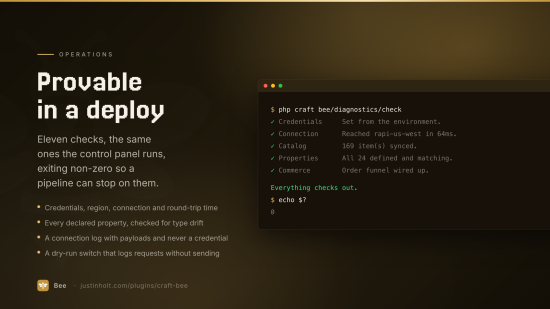
php craft bee/diagnostics/check               # exits non-zero on an error
php craft bee/diagnostics/check --offline     # no requests to Recombee
bee/diagnostics/check exits non-zero when something is actually broken, so it can gate a deploy.
Diagnostics
Bee → Diagnostics runs the same checks as the console, in the order things have to be true: plugin enabled → credentials → connection → sources → catalog → properties → recommendations → tracking → consent → multi-site → Commerce → recent failures. Every non-OK result carries a fix.
Bee → Log is the connection log: every request, its status, its duration, and both payloads. Credentials are never in it — the signature and the token live in the query string, and only the path is recorded.
Dry run builds and logs every request and sends nothing, which is how to see exactly what would be pushed before pointing Bee at a real database.
Lite and Pro
| Lite | Pro | |
|---|---|---|
| Catalog sync — entries, categories, assets, products, variants | ✓ | ✓ |
| Detail views and purchases | ✓ | ✓ |
| Recommend to user, recommend to item | ✓ | ✓ |
| Twig API, element resolution, connection log, diagnostics | ✓ | ✓ |
| Console sync, dry run, preview payload | ✓ | ✓ |
| Cart additions, bookmarks, ratings, view portions | ✓ | |
| Guest → account merge | ✓ | |
| Recombee search | ✓ | |
| Item segments | ✓ | |
Pagination (next()) | ✓ | |
| Boosters, custom logic, diversity, expert settings, ReQL expressions | ✓ | |
| Attribution ledger and the recommendations report | ✓ | |
| Historic Commerce order backfill | ✓ | |
| Client-side recommendations endpoint | ✓ |
Lite is a real integration, not a teaser: detail views and purchases are the pair that make a recommender work at all. Everything in Pro sharpens it.
Events
use justinholtweb\bee\events\InteractionEvent;
use justinholtweb\bee\services\Interactions;
use yii\base\Event;

// Don't track staff.
Event::on(Interactions::class, Interactions::EVENT_BEFORE_RECORD, function(InteractionEvent $e) {
    $e->isValid = !Craft::$app->getUser()->getIsAdmin();
});
use justinholtweb\bee\events\RecommendationEvent;
use justinholtweb\bee\services\Recommendations;

// Merchandising rules that belong to the site rather than to the model.
Event::on(Recommendations::class, Recommendations::EVENT_AFTER_RECOMMEND, function(RecommendationEvent $e) {
    // $e->set is the RecommendationSet; $e->params were the request options.
});
Support
Standard
Pro
Plus $129/year after one year.
To install this plugin, copy the command above to your terminal.
This plugin doesn't have any reviews.