 SEO & Accessibility
 AI
AI Localization
 Ecommerce
 Forms
Forms Fields
 Development
 Security
 Templating
 Performance
 Control Panel
 Widgets
 Assets
 Utilities
 Mailer Adapters
 Social Networking
 Integrations
Bundle Builder


"Can we sell these together?"
You want to sell a starter kit, a hamper, or a "buy the set and save" offer. Commerce has no bundle of its own. The usual way around it is a separate product with stock of its own, which has no notion of when the parts run out, and a customer who can't pick the size or colour of what's inside.
Bundle Builder gives you a proper bundle. You group a handful of products together and it goes into the cart as a single line at a single price, while the customer picks the variant they want for each product in it, right on the bundle's page. The bundle is a Commerce purchasable in its own right, with its own SKU and price, and you edit it in Craft's own element editor with live preview, drafts and autosave, the same as everything else.

Stock that follows the parts
A bundle doesn't hold stock of its own. It stays available as long as every component has a variant that can cover it, and it stops being available by itself when one runs dry. When the cart is saved, each chosen variant is checked against everything else in the order that needs it, so a variant that's in two bundles and bought on its own as well is checked for the lot. When the order completes, the stock comes off each chosen variant, the same as if it was sold on its own.
Pricing
Set a fixed price yourself, with an optional promotional price. Or let it add up the components' prices, sale and catalog pricing rule prices included, less a percentage or a flat amount you choose. On an automatic bundle the price follows the variants the customer picks, so you can show a "From" price and what each option adds or takes off. When a component's price changes, the bundles it's in are recalculated in the background.
When a customer wants a different size
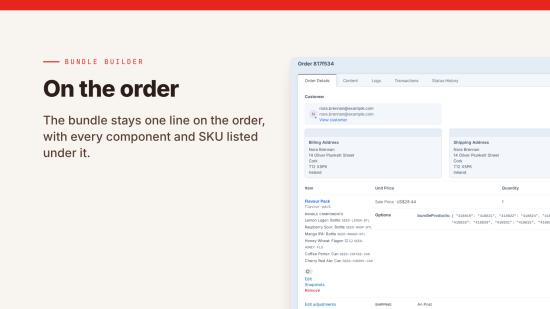
Each bundle line on the order lists the components, the variants chosen and their SKUs, so whoever is packing it knows what goes in the box. Until the order is completed, staff with the right permissions can change the variants on a bundle line, and the new choice is checked for stock.
Tax and permissions
- Composite supply taxes the whole bundle at one rate, for when one item is the main purchase and the rest come with it
- Multiple supply splits the price across the components and taxes each at its own rate, for separate items sold together
- Either is set per bundle type, and uses the VAT, GST or sales tax rates you've set up in Commerce
- Reverse charge for customers with a valid tax ID works on bundles the same as on any other line
- Each bundle type has its own permission, so staff only manage the bundles they're meant to
- Drafts and revisions of a bundle can't be added to a cart
What's in it
| Feature | What it does |
|---|---|
| Bundle types | Each with its own field layout, URLs, SKU format and tax treatment |
| Pricing | Fixed or automatic, with promotional prices and "From" prices |
| Variant choice | A choice for each component, which you can limit to some of that product's variants |
| Orders | Bundle lines that list every component, variant and SKU |
| Stock | Checked across the whole cart and taken off each chosen variant |
| GraphQL | Queries for bundles, for headless shops |
| Hyper and Navigation | Bundles as a link type in Hyper fields and as nodes in Navigation menus |
| Container Deposits | Deposits on the cans and bottles in a bundle, when Container Deposits is installed |
| Versioning | Revisions you can revert to, if you switch it on for a bundle type |
| Twig | An API for your templates |
You can try it free on any dev domain before you buy. It needs Craft CMS 5, Craft Commerce 5.3 and PHP 8.2 or later.
Accessibility
What's been checked, and anything that still needs work, is in the accessibility statement.
Standard
Plus $19/year after one year.
To install this plugin, copy the command above to your terminal.
This plugin doesn't have any reviews.