 SEO & Accessibility
 AI
AI Localization
 Ecommerce
 Forms
Forms Fields
 Development
 Security
 Templating
 Performance
 Control Panel
 Widgets
 Assets
 Utilities
 Mailer Adapters
 Social Networking
 Integrations
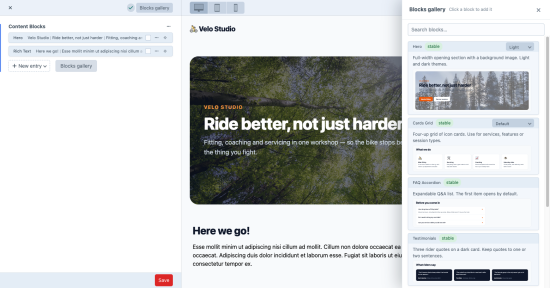
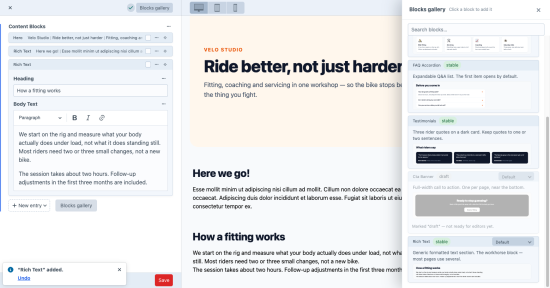
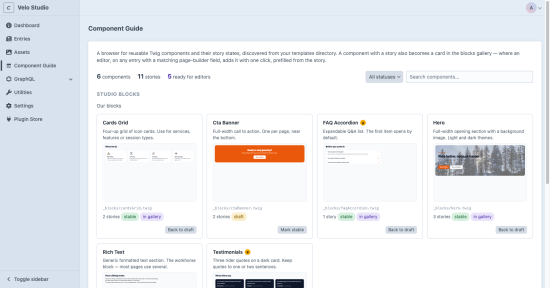
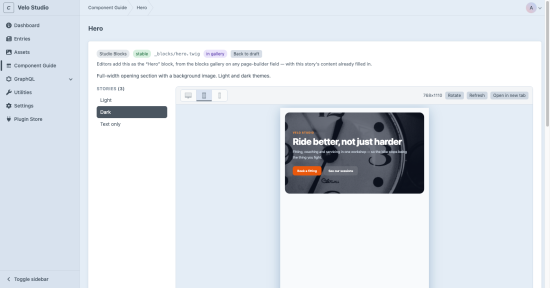
Editors ask what a block looks like. A developer answers — again. Component Guide puts the answer where both of them already work: inside the Craft control panel.
It works with the templates you already have, right where they live. Drop a GUIDE.md marker file into your blocks folder and every Twig template in it appears in the guide immediately — no configuration, no registration, no migration. Add a story file next to a template and it gets a live preview, rendered with your site's own CSS once you point the guide at it.
For developers
It's the Storybook model without the separate toolchain — nothing to build, no second environment to keep alive.
Instant inventory. A marker file lists every component you already have, documented or not. Stories are plain files. A .stories.twig (or .stories.php) next to the template, versioned in git like everything else. Scaffolding. One click writes a first-draft story from the template's own variables — including one story per state the template switches on (light/dark, media left/right). Placeholder tokens. @lorem_p_2, @image_1600x600, @icon_star — say what kind of content a story needs instead of pasting it.
For editors
Blocks gallery in Live Preview. Every Matrix page-builder field gets a gallery of real component previews with descriptions — not a dropdown of names. Click to add, prefilled. In Matrix fields shown inline, the new block arrives with the story's content, so it is visible on the page straight away. A switcher for every state. Components with more than one reproducible story let the editor choose which one they are adding, right on the card. Previews that can't go stale. They are rendered from the actual template, not screenshots someone has to keep up to date.
And it tells you when a preview is lying
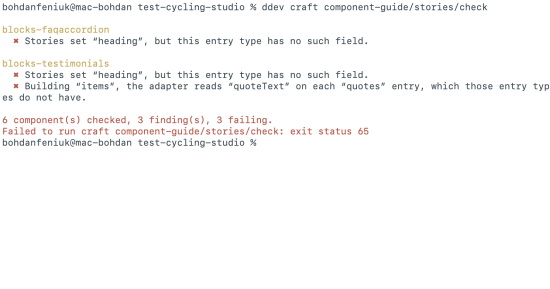
A story, an adapter and an entry type can each be correct on their own and still combine into a promise nobody can keep. The story shows a hero with a background photograph; the entry type has no image field; the gallery offers an editor a card they can never reproduce.
Rendering cannot catch that — the preview is flawless. Name matching cannot — the names line up. Component Guide reads the adapter's {% include … with { … } only %}, the one place where "this argument comes from that field" is actually written down, and compares it against the entry type's real field layout. A mismatch gets a badge on the index, and stories/check turns the same comparison into an exit code for CI — so a field renamed during a content-model cleanup breaks the build instead of surfacing months later, in front of an editor.
Zero lock-in
Nothing in your content or templates depends on the plugin. No migrations ship with it, your entries and field layouts are only ever read, and the story files stay behind as plain, readable documentation of what each component supports. Remove it and your project is exactly as it was.
It is $99 per site, free to run in development and staging, and it keeps working whether or not you renew — so on most projects it is a line in the build budget rather than a subscription.
Worth knowing. Previews are as accurate as the CSS you point them at. Components that query Craft themselves need a story that passes plain arrays instead — presentational components work as-is. The contract check gives no verdict when it cannot identify a single adapter for a component: refusing beats guessing.
Requirements: Craft CMS 5, PHP 8.2+
Lite
Pro
Plus $39/year after one year.
To install this plugin, copy the command above to your terminal.