 SEO & Accessibility
 AI
 Localization
 Ecommerce
 Forms
 Fields
 Development
 Security
 Templating
 Performance
 Control Panel
 Widgets
 Assets
 Utilities
 Mailer Adapters
 Social Networking
 Integrations

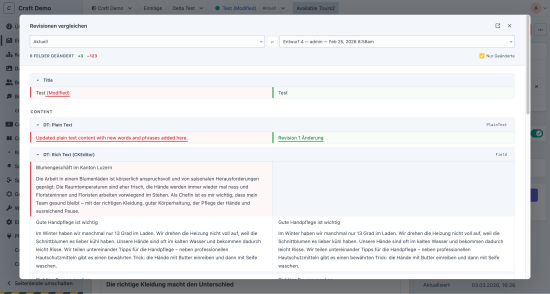
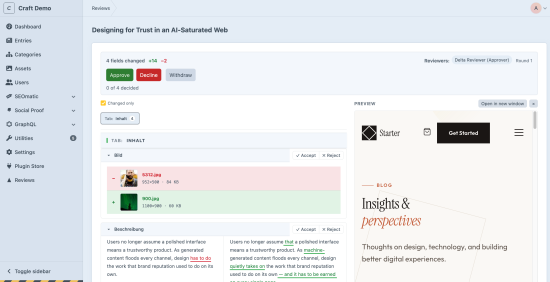
Compare any two versions of an entry - the live entry, a draft, or a revision - from the editor sidebar. The diff opens in a slideout, or as its own page.
Text is diffed word by word (Plain Text and CKEditor). Matrix is diffed block by block: added, removed, modified, and reordered. Relations, tables, dropdowns, and scalars are diffed value by value. Asset changes show the thumbnail and the filename. Unchanged fields can be hidden. A summary at the top counts fields changed, additions, and deletions. The comparison is site-aware on multi-site installs.
Review Mode
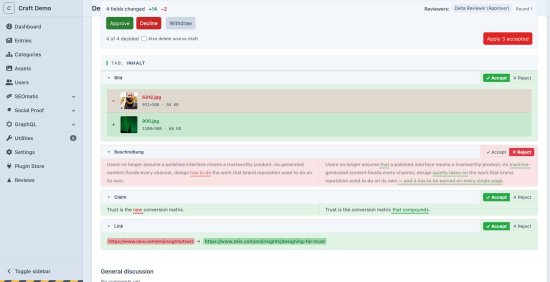
On the review page, every applicable change gets Accept or Reject - a field, a Matrix block, a field inside a block, a reorder. Keyboard shortcuts step through the list (J / K) and record a decision (A / R).
Apply publishes only the accepted changes as a new revision and closes the review. A partial apply is final: there is no second pass on the same review. Rejected changes stay in the source draft, so that leftover work is still there the next time you open the diff. Tick Also delete source draft if you want the leftovers gone. Rejecting a change opens a comment thread on that change, so the reason lives next to the decision.
Neo, Content Blocks, and Addresses are shown in the diff. They publish with the whole draft. They do not have per-change accept and reject.
Submit for review
Authors send a draft to one or more reviewers. A default reviewer can be preselected, and Submit can go straight to that person without the dialog. The picker can be limited to selected user groups, so developer and agency admins are not listed.
Reviewers approve or decline, or they leave comments and let the author revise in place. A submitted draft is not locked: the author can keep editing, and anyone who can save the draft can open it from the review page. The author can withdraw the request and resubmit it as a new round. A declined review can be resubmitted the same way, on the same draft.
Reviews happen on a dedicated page: the diff, inline comments (on a specific change or in a general discussion), reviewer verdicts, and - for sections with a front-end URL - a live preview of the draft beside the changes.
Once approved, Publish goes live now, or Schedule for… queues it. Publishing requires Delta's apply permission and Craft's native save permission, so a review-only role cannot push content live.
A Reviews dashboard in the control panel lists what is waiting on you, what you submitted, and (for admins) everything. Entry indexes get a Workflow column: In review, Approved, Scheduled, Declined, Withdrawn, Published.
Approval can require any one reviewer, all assigned reviewers, or at least N. Email goes out in the recipient's preferred language. Each email type can be turned off.
Permissions
Three plugin permissions - submit, review, apply - sit on top of Craft's native section access. Users with none of them still get the read-only diff. The workflow and Review Mode can each be turned off in settings; with both off, Delta is a diff viewer.
Also included
- CKEditor, TinyMCE, and the Code field
- Neo, Hyper, SEOmatic, Beacon SEO, Content Blocks, and Addresses
- Multi-site review: a site switcher, a warning when other sites have pending changes, and one publish that merges every site you decided
- Control panel translations: English, German, French, Spanish, Italian, Dutch, Portuguese, and Polish
Standard
Plus $5/year after one year.
To install this plugin, copy the command above to your terminal.
This plugin doesn't have any reviews.