 SEO & Accessibility
 AI
AI Localization
 Ecommerce
 Forms
Forms Fields
 Development
 Security
 Templating
 Performance
 Control Panel
 Widgets
 Assets
 Utilities
 Mailer Adapters
 Social Networking
 Integrations
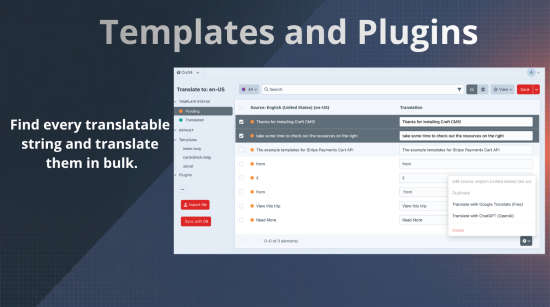
A multi-site build needs two kinds of translation: the static strings in your templates and plugins, and the content in your entries. Enupal Translate handles both.
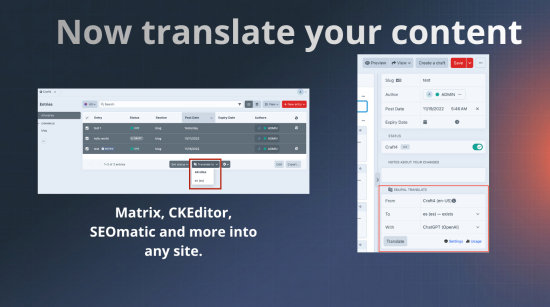
Pick a target site, hit Translate, review the draft. Bigger jobs run in the background as Craft queue jobs, so you can carry on working.
🌍 Translate your content
Translate any entry, asset, category or product into another site from the sidebar, or select several on the index and do them in bulk.
Craft fields
- Matrix, including nested blocks
- Plain Text
- Table — text columns only, numbers and dates left alone
- Link — the label, never the URL
- Content Block
- Asset alt text
Rich text
- CKEditor
- Redactor
- TinyMCE
- Vizy
Plugin fields
- Neo
- Super Table
- Hyper
- Linkit
- SEOmatic — only the fields you've overridden, so inheritance stays intact
- Ether SEO
Your own field types can join in through an event.
Everything else is left alone: images, dropdowns, numbers and relations are never touched. Internal links follow the translation, so a link to an English entry becomes a link to its Spanish counterpart.
📝 Translate your templates and plugins
The original feature, unchanged.
- Sync with the database so you can deploy without committing translations to git, and without extra queries slowing pages down
- Import and export CSV for all templates, a single template, or a plugin's strings
- Plugin developers: translation files are written straight into your plugin's path
🤖 Choose your translator
- OpenAI or Claude for translations that read naturally, with your own prompt, protected terms and tone of voice
- Google Cloud Translate or Yandex for fast, cheap machine translation
- Google Translate (Free) for trying things out
- Or type them yourself
AI providers see a whole entry at once rather than field by field, so the result reads like a page instead of disconnected sentences. Repeated strings are sent once, so you never pay twice for the same words.
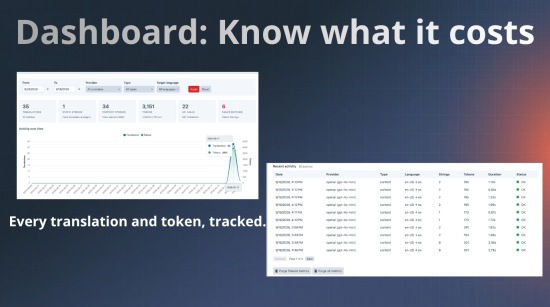
📊 Know what it costs
A dashboard shows how many translations you've made, split between templates and content, with token usage, API calls and anything that failed. Filter by date, provider, type or language.
✅ Good to know
- Translations save as drafts by default, so nothing goes live unreviewed
- API keys can live in your
.envrather than in project config - A permission controls who can translate
- Requires Craft 5.5.4+ and PHP 8.2+
Content translation and the AI providers are new in 5.0 and still being proven on real sites. If you hit something, please open an issue on GitHub.
Standard
Plus $9/year after one year.
To install this plugin, copy the command above to your terminal.