 SEO & Accessibility
 AI
AI Localization
 Ecommerce
 Forms
Forms Fields
 Development
 Security
 Templating
 Performance
 Control Panel
 Widgets
 Assets
 Utilities
 Mailer Adapters
 Social Networking
 Integrations
Logging Library
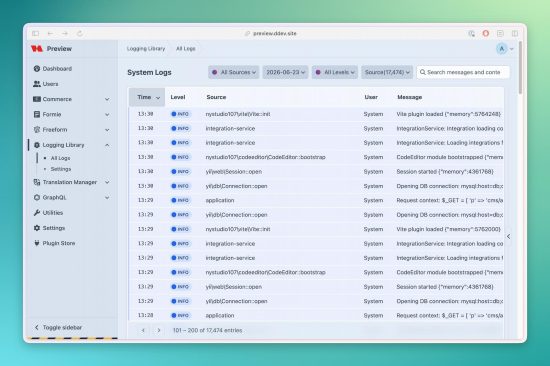
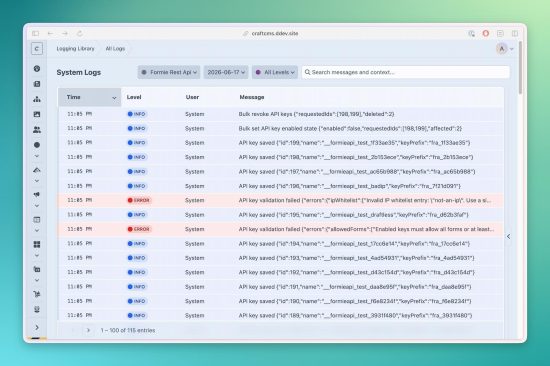
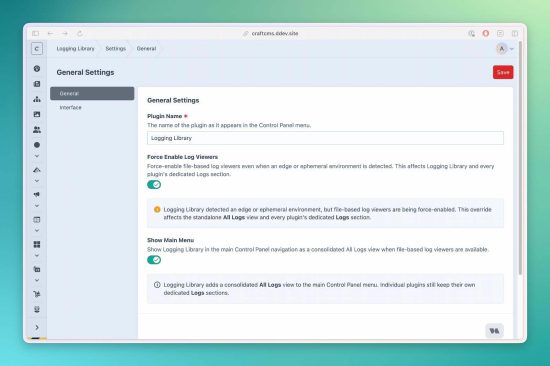
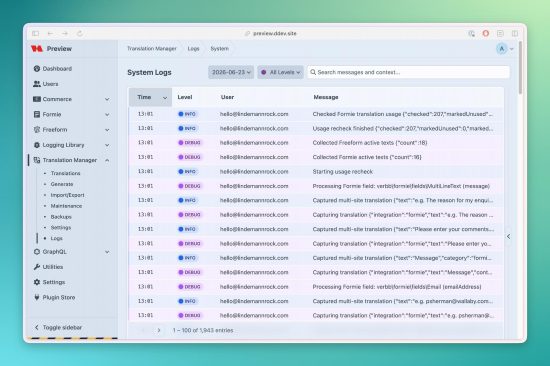
Logging Library brings Craft, plugin, and PHP log files into the Control Panel—and gives you an auto-refreshing view of recent runtime messages without relying on local log files.
Built as the shared logging foundation for the LindemannRock plugin suite, it also works as a standalone diagnostics tool and a reusable logging library for your own plugins and modules. Free and open source, built on Craft's native logging system.
Runtime Logs—without relying on log files
See what your site just logged, even on hosting where local files don't persist. Runtime Logs captures a rolling window of recent messages for investigation inside Craft, including on ephemeral hosting such as Servd and Craft Cloud.
Expanded in 5.19: manage runtime capture directly under Settings → Runtime Logs, with named source pickers and separate permissions for viewing and clearing runtime entries.
- Choose what to capture — select log levels and include or exclude named sources or custom category patterns.
- Keep a bounded diagnostic window — set retention, maximum entries, and message/context size limits.
- Find the relevant entries — filter by level or source, search messages and context, and expand rows for more detail.
- Watch recent activity — configure automatic refresh, which pauses while a row is expanded so you can finish reading.
- Enable it when needed — capture is off by default, with console and queue capture excluded by default too.
Storage follows Craft's application cache configuration, with a dedicated Redis list backend when the application cache uses Redis. Multi-server installations need shared cache storage to show entries from all instances.
Runtime Logs is a short-lived diagnostic window, not a permanent archive: entries expire, roll off at the configured limit, or may be evicted by the cache. It does not import hosted log feeds or replace your hosting provider's log history.
File log viewers
Browse the log files already available in your site's storage/logs/ without leaving Craft.
- All Logs — access Craft, plugin, and PHP error log files from one viewer.
- Plugin-specific viewers — integrating plugins can expose their own file logs in their Control Panel section.
- Search, filter, and sort — narrow the selected file by level, source, or category, search messages and context, and sort the results.
- Readable details — inspect timestamps, messages, and expandable structured context; download the selected raw file when needed.
- Multiple log formats — read plugin logs, Craft web/queue/console logs, PHP error logs, and Monolog's bracketed ISO-8601 format.
- Indexed file caching — an SQLite index serves filtered, sorted, paginated results after parsing, with automatic invalidation when the file changes.
Consistent logging for your own plugins
Give your plugin dedicated daily log files and a ready-made file viewer instead of building a separate logging interface.
- LoggingTrait — use
logInfo(),logWarning(),logError(), andlogDebug()from your classes. - LoggingService — a static API for logging, recent entries, statistics, and cleanup.
- Reusable integration — configure your plugin's logging target and file viewer through
LoggingLibrary::configure(). - Structured context — attach useful details to a message as an array.
Once your plugin is configured and your class uses LoggingTrait with the appropriate logging handle, a log call looks like this:
$this->logInfo('Import completed', [
    'imported' => 42,
    'skipped' => 3,
]);
Settings and access control
- Dedicated settings sections — manage general preferences, file viewers, runtime capture, and interface options from the Control Panel.
- Environment-specific overrides — keep selected settings in
config/logging-library.php; explicit overrides take precedence over saved preferences. - Separate file and runtime permissions — control file viewing, file downloads, file-viewer cache clearing, runtime viewing, runtime clearing, and settings access independently.
- Permission-checked downloads — file downloads are validated against path traversal and restricted to authorized users.
Hosting-aware
Logging Library recognizes Craft's ephemeral-storage signal, including Craft Cloud, and detects Servd. File viewers are hidden by default on those environments, while Runtime Logs remains available when explicitly enabled. A force-enable option lets you restore file viewers when persistent log files really are available.
Normal Craft logging and your hosting platform's log collection continue independently of the viewer settings.
Localized interface
The plugin's own Control Panel is fully translated into 12 languages: Arabic, Danish, Dutch, English, French, German, Italian, Japanese, Norwegian, Portuguese, Spanish, and Swedish.
To install this plugin, copy the command above to your terminal.
This plugin doesn't have any reviews.