 SEO & Accessibility
 AI
 Localization
 Ecommerce
 Forms
 Fields
 Development
 Security
 Templating
 Performance
 Control Panel
 Widgets
 Assets
 Utilities
 Mailer Adapters
 Social Networking
 Integrations

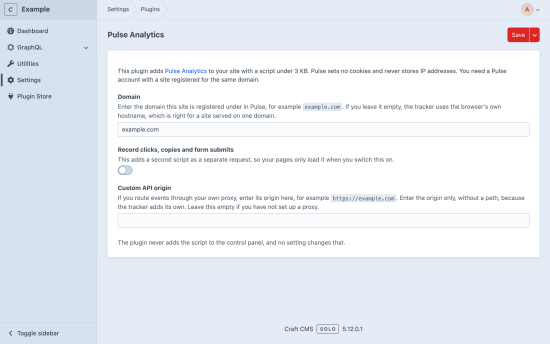
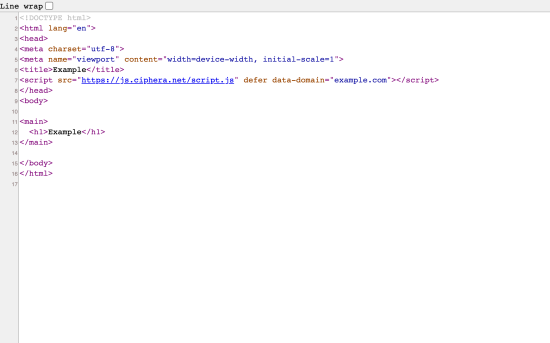
Pulse Analytics adds privacy-first web analytics to a Craft CMS site with one plugin. It sets no cookies and never stores IP addresses. The script it adds to your pages is about 3 KB.
How it works
- Run
composer require ciphera/craft-pulse-analyticsandphp craft plugin/install pulse-analytics. - Go to Settings > Plugins > Pulse Analytics and enter the domain your site is registered under in Pulse. If you leave it empty, the tracker uses the browser's own hostname, which is right for a site served on one domain.
- Make sure your layout calls
{{ head() }}. Craft outputs head-registered scripts only at that call, and this plugin registers its script that way.
Your dashboard at pulse.ciphera.net shows visitors as they arrive.
What it measures
Pulse counts pageviews, referrers, countries, devices, time on page and scroll depth, plus the goals, funnels and campaigns you set up, in one dashboard hosted in Switzerland. It does not count visitors whose browser sends Do Not Track or Global Privacy Control. The plugin never tags the control panel, and no setting changes that.
Options
You can set a custom API origin if you route events through your own proxy. Scroll depth, outbound links, file downloads, and clicks, copies and form submits are each switched on or off in your site's settings in Pulse (Settings > General). The tag stays the same, so there is nothing to change here.
You need
Craft CMS 5, PHP 8.2+, and a Pulse Analytics account with a site registered for the same domain. The free plan covers one site and 10,000 events a month, and you do not need a card. Business starts at 9 EUR a month with VAT. Every plan has every feature.
To install this plugin, copy the command above to your terminal.
This plugin doesn't have any reviews.